Drop a Video File, Get a YouTube-Ready Recap - My Fully Automated Python Pipeline
Author: jebin2 Published: Updated: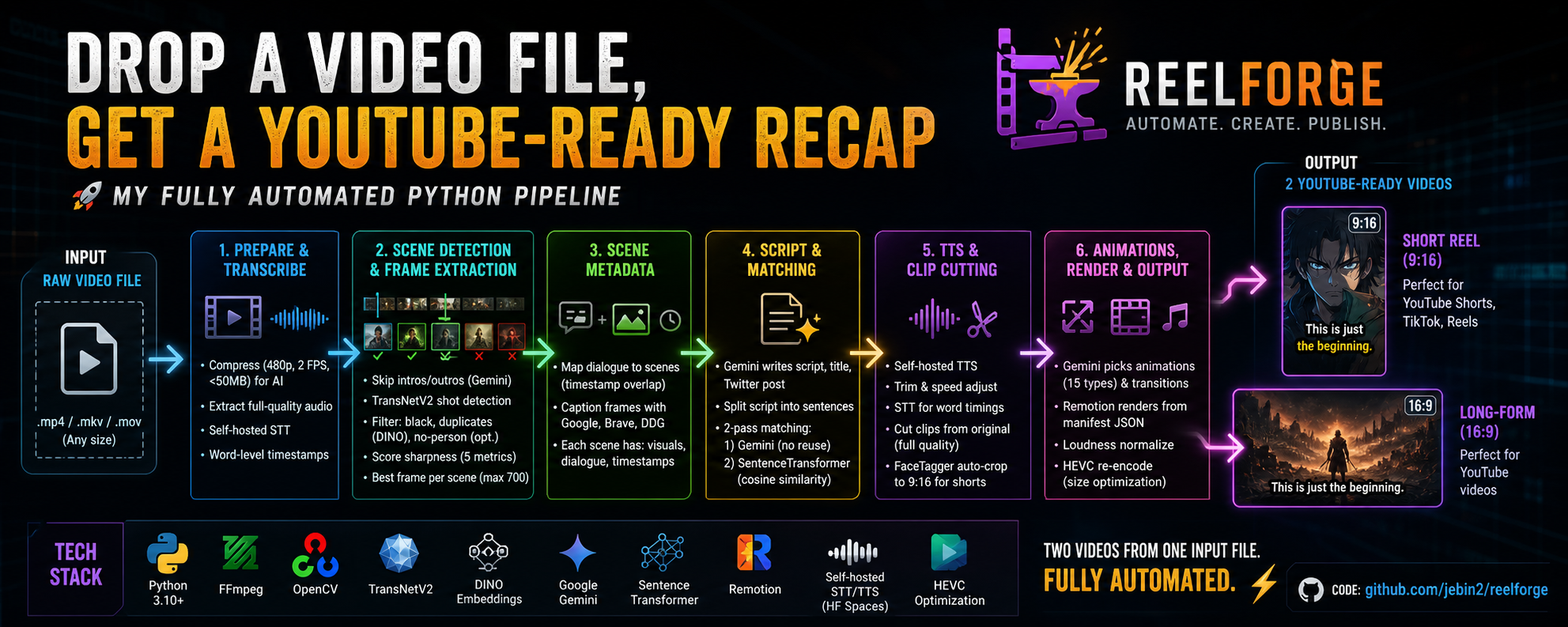
I was spending hours editing recap videos by hand. Trimming, scripting, syncing subtitles, cropping for vertical all assembly line work. So I automated the entire thing.
I built ReelForge a Python pipeline where you drop in a raw video file (movie, anime episode, whatever) and get back two publish ready videos: a 9:16 short reel and a 16:9 long-form video. Narration, subtitles, animations, transitions. I don't touch a video editor at any point.
Preparing the video for AI
The original file could be gigabytes. I can't throw that at an LLM. So the pipeline creates a tiny compressed copy 480p, 2 FPS, under 50MB. Sounds absurd, but Gemini doesn't need smooth playback. It just needs to see what's happening.
Audio gets extracted separately from the original (full quality, not the compressed copy) and run through my self-hosted STT service. I get back word-level timestamps for every spoken word these drive everything downstream: credit detection, dialogue mapping, and the word-by-word subtitle animations in the final video.
Detecting scenes and extracting the best frames
First, I skip intros and outros automatically. The first/last 300 seconds of transcription go to Gemini it spots song lyrics, musical patterns, credits and marks them as off-limits.
Then TransNetV2 (a neural net for shot boundary detection) finds every scene change. No dumb fixed-interval extraction.
For each scene, I sample up to 5 frames and filter hard: reject black frames, reject duplicates (using DINO embeddings for visual similarity), optionally require a person in frame. What survives gets scored on five sharpness metrics - Laplacian, Sobel, Tenengrad, edge density, local contrast. Sharpest frame wins. Capped at 700 total.
Building the scene metadata
Each scene gets matched with its dialogue based on timestamp overlap, creating a scene-dialogue map. Then I caption every frame using three Free AI search engines in parallel Google, Brave, DuckDuckGo each analyzing the image with content context.
So now every frame has: its visual description, its spoken dialogue, and its timestamps. This is what makes the narration-to-scene matching actually work.
Writing and matching the recap
Gemini generates the narration script from content-specific prompts anime recaps get fan energy with cliffhanger endings, movie recaps get a cinematic tone. The script gets split into individual sentences, each becoming one clip.
Matching each sentence to the right frame is probably the trickiest part. I do it in two passes: Gemini pairs sentences to scene captions first (no reuse allowed), then a SentenceTransformer model refines the matches using cosine similarity in embedding space. The two-pass approach was necessary cause the LLM alone makes reasonable but not great picks, and the embeddings catch better visual matches.
Generating speech and cutting clips
Each sentence goes through my self-hosted TTS service, gets trimmed and speed-adjusted. Then I feed each audio file back through STT because I need word-level timestamps for the generated speech, not the original. These timings make the subtitles animate one word at a time. It makes a huge difference.
Video clips are cut from the original full-quality source, centered on each matched frame's timestamp. For short-form, FaceTagger auto-crops every clip to 9:16, keeping detected faces and characters centered way better than a dumb center-crop.
Animations, rendering, and final output
Gemini picks camera animations (15 types "burst" for impacts, "ken_burns" for emotion, "heartbeat" for suspense) and transitions (cuts, fades, slides, wipes, flips, tosses) based on what the narration is saying. Rules prevent repetition.
The final video is rendered with Remotion, a React-based programmatic video framework. It reads a manifest JSON with all clip paths, audio, word timings, animations, and transitions and produces the complete video.
The whole pipeline runs a second time for the 16:9 long-form version with a more detailed script but it reuses the scene data from the first run, so the expensive work doesn't repeat.
Two videos from one input file. Fully automated.
Tech stack
Python 3.10+ · FFmpeg · OpenCV · TransNetV2 · DINO embeddings · Google Gemini · SentenceTransformer · Remotion · Self-hosted STT/TTS on HF Spaces · HEVC optimization
Code is here: github.com/jebin2/reelforge
TTS Service: https://jebin2-tts.hf.space/
STT Service: https://jebin2-stt.hf.space/